Skip to content
Welcome To Our Store.
100,000+ Products for Home, Medical, Office & Classroom Needs
Search
Skip to product information
1 of 1

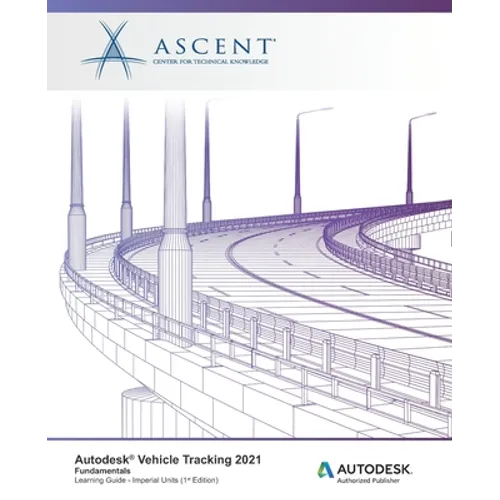
Autodesk Vehicle Tracking 2021 Fundamentals (Imperial Units): Autodesk Authorized Publisher - Paperback

$76.75 USD
$76.75 USD
Sale Sold out
Shipping calculated at checkout.
In stock (100 units), ready to be shipped

Available Offers

Fastest Delivery Tomorrow With Vip DealOrder within 1 hr 8 mins.

Instant 10% Discount On HDFC Banks Credit/Debit Cards EMI and CreditCard

Secure checkout with
  • American Express
  • Apple Pay
  • Diners Club
  • Discover
  • Google Pay
  • Mastercard
  • PayPal
  • Shop Pay
  • Visa
  • Daily deals
  • Return policy
  • Payment method
  • Help center 24/7

Flight Range: Up to 1,000 meters (3,280 feet)

Maximum Speed: 45 kilometers per hour (28 miles per hour)

For all orders exceeding a value of 100USD shipping is offered for free.

Returns will be accepted for up to 10 days of Customer’s receipt or tracking number on unworn items. You, as a Customer, are obliged to inform us via email before you return the item.

Otherwise, standard shipping charges apply. Check out our delivery Terms & Conditions for more details.

View Product Details
Shopping cart
Product Product subtotal Quantity Price Product subtotal
Autodesk Vehicle Tracking 2021 Fundamentals (Imperial Units): Autodesk Authorized Publisher - Paperback
$76.75/ea
$0.00
$76.75/ea $0.00

Product Description

by Ascent - Center for Technical Knowledge (Author)

This guide will provide an introduction to the Autodesk(R) Vehicle Tracking module that can be added to Autodesk(R) Civil 3D(R), as well as to the AutoCAD(R) and AutoCAD(R) Architecture software. The Vehicle Tracking module is an extensive transportation analysis and design solution for vehicles of all sorts. This software also features specialized tools for parking lot layout and roundabout design.

Topics Covered

  • Navigate through the Vehicle Tracking user interface.
  • Use the Vehicle Library.
  • Create and edit paths using options such as Arc mode, Bearing mode, or Guided Paths.
  • Run Vertical Clearance to check for clash locations.
  • Use Design Checks to further analyze the design.
  • Create animations of navigating through a chosen path.
  • Create and edit parking lots using various row options.
  • Create and edit roundabouts with and without corridor functionality.

Prerequisites

  • Access to the 2021.0 version of the software, to ensure compatibility with this guide. Future software updates that are released by Autodesk may include changes that are not reflected in this guide. The practices and files included with this guide might not be compatible with prior versions (e.g., 2020).
Number of Pages: 194
Dimensions: 0.41 x 9.25 x 7.5 IN
Publication Date: November 06, 2020
you might like